实验介绍 在本练习中,您将实现线性回归,并了解它的工作原理
实验文件:
ex1.m - Octave/MATLAB脚本,帮助您完成练习
ex1 multi.m - 多个 Octave/MATLAB 脚本,用于练习的后续部分
ex1data1.txt - txt-单变量线性回归数据集
ex1data2.txt - txt-多变量线性回归数据集
submit.m - 将您的解决方案发送到我们的服务器
[?] warmUpExercise.m - Octave/MATLAB中的简单示例函数
[?] plotData.m - 用来显示数据集的函数
[?] computeCost.m - 用来计算线性回归的成本的函数
[?] gradientDescent.m - 用来运行梯度下降的函数
[†] computeCostMulti.m - 多变量代价函数
[†] gradientDescentMulti.m - 多变量梯度下降
[†] featureNormalize.m - 用于规范化特征的函数
[†] normalEqn.m - 用于计算正规方程组的函数
在整个练习中,您将使用 ex1.m 和 ex1 multi.m,这些脚本为问题设置数据集,并调用将要编写的函数,您不需要修改它们中的任何一个,您只需按照本任务中的说明修改其他文件中的函数
对于这个编程练习,您只需要完成练习的第一部分,就可以使用一个变量实现线性回归,练习的第二部分是可选的,内容包括使用多变量
PS:由于本人不会使用 Octave,以下实验是在 github 上找的 python 版本
Linear regression with one variable(单变量线性回归) 在本练习的这一部分中,您将使用一个变量实现线性回归,以预测食品卡车的利润:
假设你是一家连锁餐厅的首席执行官,正在考虑在不同的城市开设一家新的分店
这家连锁店在各个城市都有卡车,你可以从这些城市获得利润和人口数据
您希望使用这些数据来帮助您选择下一步要扩展到哪个城市
文件 ex1data1.txt 包含线性回归问题的数据集(第一列是一个城市的人口,第二列是该城市食品卡车的利润,利润为负值表示亏损)
脚本 ex1.m 已经被设置好你需要加载的这些数据
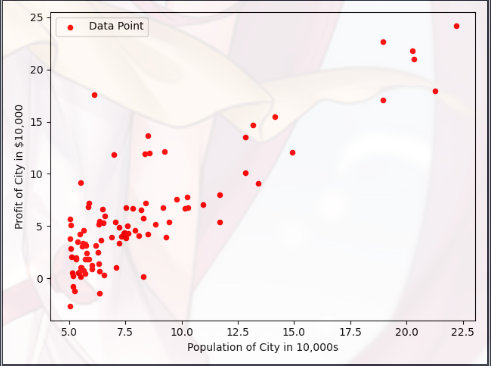
Plotting the Data A(绘制数据) 在开始任何任务之前,通过可视化来理解数据通常是有用的
对于这个数据集,您可以使用散点图来可视化数据,因为它只有两个属性需要绘制 - 利润和人口(你在现实生活中会遇到的许多其他问题都是多维的,无法绘制在二维图上)
在 ex1.m 中,数据集从数据文件加载到了变量X和Y中:
1
2
3
4
5
6
7
8
9
10
11
12
13
14
15
16
17
18
import matplotlib.pyplot as plt print ('读取数据,并绘制散点图...\n' )filepath = r'data\ex1data1.txt' dataset = np.loadtxt(filepath, delimiter=',' , usecols=(0 ,1 )) Xdata = dataset[:,0 ] Ydata = dataset[:,1 ] plt.figure(0 ) plt.scatter(Xdata,Ydata,c='red' ,marker='o' ,s=20 ) plt.xlabel('Population of City in 10,000s' ,fontsize=10 ) plt.ylabel('Profit of City in $10,000' ,fontsize=10 ) plt.legend(['Data Point' ]) plt.show()
loadtxt(filepath , delimiter , usecols):从文件路径 filepath 中读取第 usecols 列的数据,以 delimiter 为数据之间的间隔
这里使用了 Matplotlib Pyplot 模块(Pyplot 是常用的绘图模块,能很方便让用户绘制 2D 图表)
Gradient Descent(梯度下降)
1
2
3
4
5
6
7
8
9
10
11
12
13
14
15
16
17
import numpy as npfrom computeCost import compute_costdef gradient_descent (X,Y,theta_init,alpha,iter_num ): m = Y.shape[0 ] J_history = np.zeros(iter_num) theta = theta_init for num in range (0 ,iter_num): J_history[num] = compute_cost(X,Y,theta) hyp = np.dot(X,np.transpose(theta)) theta = theta - alpha * np.dot(np.transpose(hyp -Y),X) / m return theta,J_history
zeros():返回来一个给定形状和类型的,用“0”填充的数组
shape():它的功能是读取矩阵的长度,比如 “shape[0]” 就是读取矩阵第一维度的长度
Mean squared error(代价函数-均方误差)
1
2
3
4
5
6
7
8
9
10
import numpy as npdef compute_cost (X,Y,theta ): hypthesis = np.dot(X,np.transpose(theta)) cost = np.dot(np.transpose(hypthesis - Y),(hypthesis -Y)) cost = cost / (2 * X.shape[0 ]) return cost
dot(x , y):两个数组作矩阵乘积,当两个数组的维度不能直接进行矩阵乘法时,dot会把尝试后面的参数进行转置
transpose(x):把矩阵进行转置
Completion process(具体的拟合过程)
1
2
3
4
5
6
7
8
9
10
11
12
13
14
15
16
17
18
19
20
21
22
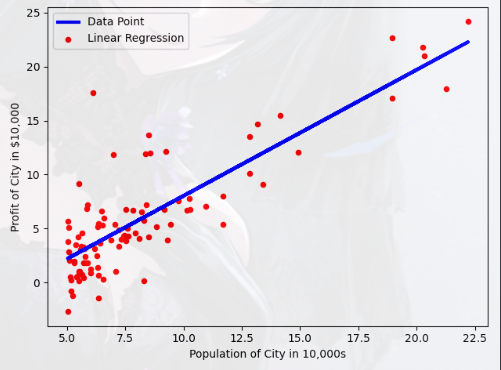
import numpy as npprint ('进行梯度计算...\n' )X = np.c_[np.ones(Xdata.shape[0 ]),Xdata] Y = Ydata theta_init = np.zeros(X.shape[1 ]) iter_num = 1500 alpha = 0.01 print ('Initial cost:' , str (compute_cost(X,Y,theta_init)), '\nThis value should be 32.07' ) theta_fin,J_history = gradient_descent(X,Y,theta_init,alpha,iter_num) print ('Theta found by gradient descent:' ,str (theta_fin.reshape(2 )))plt.figure(1 ) plt.scatter(Xdata,Ydata,c='red' ,marker='o' ,s=20 ) plt.plot(X[:,1 ],np.dot(X,theta_fin),'b-' ,lw=3 ) plt.xlabel('Population of City in 10,000s' ,fontsize=10 ) plt.ylabel('Profit of City in $10,000' ,fontsize=10 ) plt.legend(['Data Point' ,'Linear Regression' ]) plt.show()
ones(shape , dtype=None , order=’C’):返回给定形状和数据类型的新数组
c_[ x , y ]:按列叠加两个矩阵,把两个矩阵左右组合,要求行数相等
1
2
3
4
5
6
7
8
9
x_1 = [[1 2 3 ] [4 5 6 ]] x_2 = [[3 2 1 ] [8 9 6 ]] x_new = [[1 2 3 3 2 1 ] [4 5 6 8 9 6 ]]
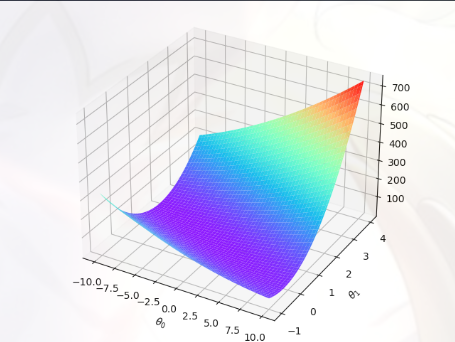
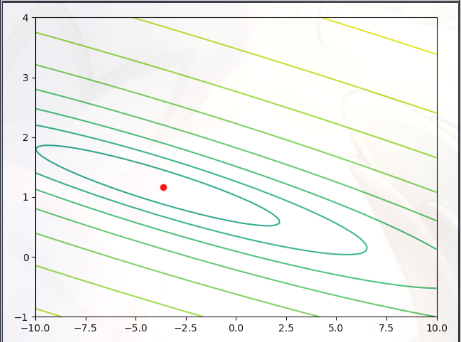
Visualizing J(θ)(可视化代价函数的执行过程) 为了更好地理解代价函数 J(θ),我们将生成 J(θ)的曲面和等高线图
1
2
3
4
5
6
7
8
9
10
11
12
13
14
15
16
17
18
19
20
21
22
23
24
25
26
27
28
29
from mpl_toolkits.mplot3d import Axes3Dfrom matplotlib.colors import LogNormtheta0_vals = np.linspace(-10 ,10 ,100 ) theta1_vals = np.linspace(-1 ,4 ,100 ) xs,ys = np.meshgrid(theta0_vals,theta1_vals) J_vals = np.zeros(xs.shape) for i in range (0 ,theta0_vals.size): for j in range (0 ,theta1_vals.size): t = np.array([theta0_vals[i],theta1_vals[j]]) J_vals[i][j] = compute_cost(X,Y,t) J_vals = np.transpose(J_vals) figure = plt.figure(2 ) ax = Axes3D(figure) ax.plot_surface(xs,ys,J_vals,cmap='rainbow' ) plt.xlabel(r'$\theta_0$' ) plt.ylabel(r'$\theta_1$' ) plt.show() plt.figure(3 ) lvls = np.logspace(-2 , 3 , 20 ) plt.contour(xs, ys, J_vals, levels=lvls, norm = LogNorm()) plt.plot(theta_fin[0 ], theta_fin[1 ], 'ro' ,markersize =6 ) plt.show()
linspace(start , stop , num=50 , endpoint=True , retstep=False , dtype=None):用于在线性空间中以均匀步长生成数字序列
meshgrid(theta0_vals , theta0_vals):生成坐标矩阵
array(A , B , …. ):创建一个数组(参数有几个就是几维)
logspace(start , stop , num=50 , endpoint=True , base=10.0):把范围是 “[base的start次方,base的stop次方]” 的数据,在对数尺度上返回间隔均匀的数字(有点看不懂)
1
2
3
4
5
6
>>> np.logspace(2.0 , 3.0 , num=4 )array([ 100. , 215.443469 , 464.15888336 , 1000. ]) >>> np.logspace(2.0 , 3.0 , num=4 , endpoint=False ) array([100. , 177.827941 , 316.22776602 , 562.34132519 ]) >>> np.logspace(2.0 , 3.0 , num=4 , base=2.0 )array([4. , 5.0396842 , 6.34960421 , 8. ])
结果如下:
Linear regression with multiple variables(多元线性回归) 在这一部分中,您将使用多变量线性回归来预测房价:
假设你要卖房子,你想知道一个好的市场价格是多少
一种方法是首先收集最近售出房屋的信息,并制作一个房价模型
文件 ex1data2.txt 包含 Portland 房价的培训数据集(第一栏是房子的大小,第二栏是卧室的数量,第三栏是房子的价格)
脚本 ex1_multi.m 已设置脚本以帮助您逐步完成此练习
Feature Normalization(特征规范化) 脚本 ex1_multi.m 首先加载并显示此数据集中的一些值,通过查看这些值,注意到:房屋大小大约是卧室数量的1000倍
当特征相差几个数量级时,首先执行特征缩放可以使梯度下降更快地收敛
Feature Normalization 的原理
从数据集中减去每个特征的平均值
减去平均值后,再将特征值按各自的“标准偏差”进行缩放(除)
Feature Normalization 代码实现:
1
2
3
4
5
6
def feature_normalize (Xdata ): X_mean = np.mean(Xdata,axis=0 ) X_std = np.std(Xdata,axis=0 ) X_norm = np.divide(np.subtract(Xdata,X_mean),X_std) return X_norm,X_mean,X_std
mean(A , axis=0):计算每一维度的均值
std(A , axis=0):计算沿指定轴的标准差
divide(A , B):数组对应位置元素进行除法
subtract(A , B):数组对应位置元素进行减法
Completion process(具体过程)
1 2 3 4 5 6 7 8 9 data = np.loadtxt(r'data\ex1data2.txt' ,delimiter =',' ) Xdata = data[:,0 :2 ] Ydata = data[:,2 ] X,mu,sigma = feature_normalize(Xdata) print ('Mu is:' ,mu)print ('Sigma is:' ,sigma)X = np.c_[np.ones(X.shape[0 ]),X] Y = Ydata
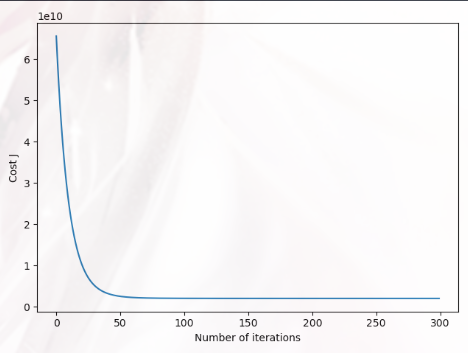
Plotting the Data B(绘制数据) 这一部分我们需要绘制反应 “迭代次数和代价函数值关系” 的图形,还是使用梯度下降法求解:
1
2
3
4
5
6
7
8
9
10
11
12
13
14
15
16
from gradientDescent import gradient_descent as gdtheta_init = np.zeros(X.shape[1 ]) alpha = 0.05 num_iters = 300 theta,J_history = gd(X,Y,theta_init,alpha,num_iters) plt.figure() plt.plot(np.arange(J_history.size),J_history) plt.xlabel('Number of iterations' ) plt.ylabel('Cost J' ) plt.show() print ('Theta computed from gradient descent : \n{}' .format (theta))
梯度下降算法和前面实现的一样,就不多赘述了,下面是“预测”的过程:
1 2 3 4 Xtest = np.array([1 ,1650 ,3 ]) price = np.dot(Xtest,np.transpose(theta)) print ('Predicted price of a 1650 sq-ft, 3 br house (using normal equations) : {:0.3f}' .format (price))
结构如下: